Thursday, May 6, 2010

Track the Books You Have (and Want To) Read with Goodreads


Goodreads describes itself as the largest book social network for readers in the world. I can’t comment on the scale of the site, but it sure does a great job of tracking books, and like the best libraries, it’s both quiet and unobtrusive. Let me show you around.
We’ve talked about Goodreads on MakeUseOf before. It’s one of a list of virtual libraries in a post from Bakari, and one of the four great ways to keep track of an expanding book collection according to TJ. I want to dig a little deeper, because in my next post I want to show you how to get information out of Goodreads for other purposes.

To start, there’s a thoroughly familiar and free sign-up process. Done? Good. Log in, and we can take a look around. There are essentially two common tasks you’re going to want to undertake in here. Let’s just work through them.

Add Books You Own Or Have Read
Depending on your needs, and likely your personality type, you may or may not want to trawl through your bookshelves at home and add all the books you already have. Or you might just want to start from where you are now. I’m a mixture. I have added books around the home, but increasingly now I’m reading some books electronically, so there is no evidence in the shelves. I add them anyway.
I have something of an interest in vampires and werewolves. I’ve been around long enough to remember the genre before it became trendy, but that’s another story.
How about we go through and add a vampire book? Richard Matheson’s I am Legend for example.
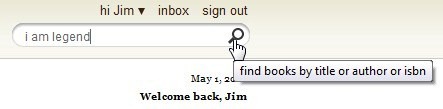


First, you need to search for the book, click the button, and find it in the list returned.
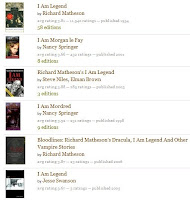


As you can see, GoodReads has a comprehensive set of books. Fortunately for us we want the first one in the list.
Click the add to my books button, ignoring the other options for now, and you’ll land on a page where you can take some more comprehensive action.
Firstly, you can assign a rating. I’d give this a three…
Then you can complete the review and date sections if you wish.
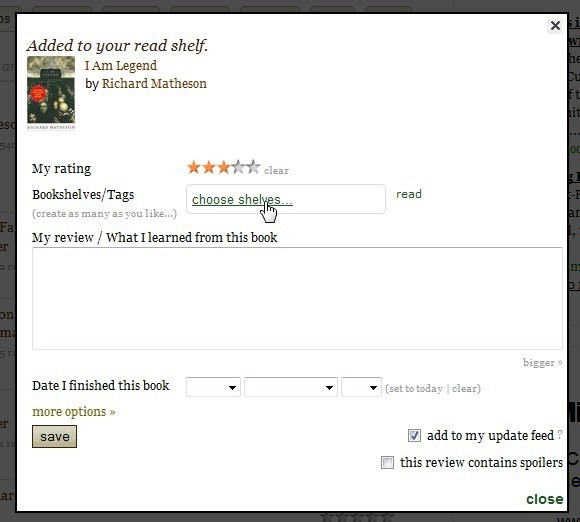


Before we go further though, I’d like to talk about the shelves.
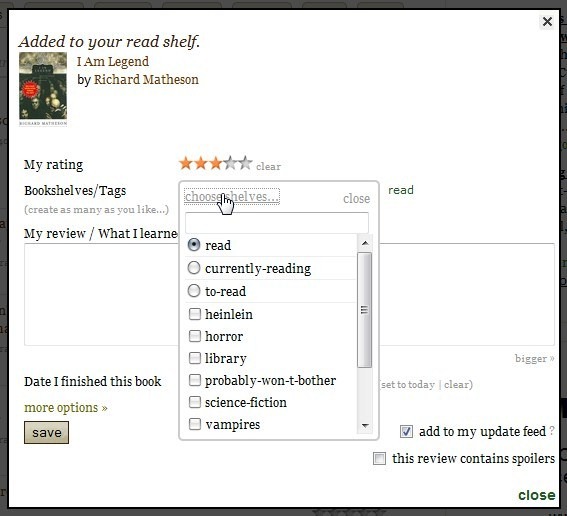


When you first start using Goodreads, the only shelves to put your books on are read, currently-reading and to-read, and these shelves are exclusive. That is, each book can only be on one shelf at any one time. You’re read it, you are reading it, or you plan to read it.
You can add more shelves, and they are not exclusive. That is, this book can be listed under both vampires and horror, if that is appropriate.

For now, click on read. Click close, and save. Does this ongoing lack of upper-case letters drive you nuts? Oh, it’s just me? Oh.
Locate the my books link at the top of the page, click that, and we can take a look as some of the options.

Down the left side of the page is a list of your books. If you’ve just started then the only book listed will be the one you just added. The books are totalled on the basis of the shelves they are on, and you can click on the shelf title to filter to just those books.

As you can see, I’m not very good at classifying my books. I’ll get there.
At the top of the list is an edit option for the shelves. If you want to do some heavy shelf construction this is the spot.

The main part of the page lists all your books, or the filtered list if you’ve clicked on one of the shelf titles.
You can edit the details for each book at any time.

Add Books You Haven’t Read
This should be easy, right?
I use Goodreads as my main way to track the books I need to buy or borrow, because without some help I’m prone to picking up a book and getting fifty pages in before realising that I’ve read it before. That’s just me too, right?
Goodreads does a great job of finding books that you might like to waste some time with, but in this case a good friend has told me that I need to read a book called The Historian by Elizabeth Kostova, which may or may not be good advice. It’s a story about Dracula, so the chances are good.

First, do a search, and find the book.


We are in luck again. The book we want is the first on the list. Click the add to my books button again.
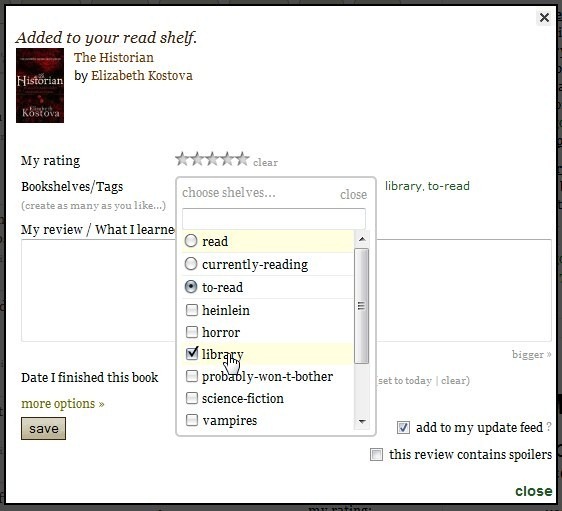


In my case, I want to tag it as a book to read, and also tick the library shelf I created, so I know to look for it next time I’m cruising the real shelves in town.
On that subject, my next post is about how to take this booklist out of Goodreads and take it to the library with you. More on that soon. In the meantime, don’t you need to work your way through the living room shelves?
MakeUsof 5/2010

Friday, April 30, 2010

2010 A Library Odyssey


Attention: Waterofrd Public Library Staff!

Make plans to attend the Support Staff Section Conference on May 26 at the Fox Valley Technical College in Appleton from 9:00 a.m. to 3:30 p.m. The conference is sponsored by the WLA Support Staff Section and the Fox Valley Technical College. Sessions include: Are You Game?: The Library's Place in the World of Gaming by Jeannie McBeth, BadgerLink: Now and Moving Forward by Martha Farley Berninger and Social Media 101 by Laurie Boettcher. See Andrea if you are interested in attending.

Wednesday, April 28, 2010

The 10 Best Free Anti-Virus Programs

Microsoft Security Essentials
Released by Microsoft in late 2009, Microsoft Security Essentials sports more than a typically verbose Microsoft name: it's also a really good antivirus. Leightweight enough to run on older machines without cripplign their performace, yet competent enought to handle most viruses and malware out there.

AVG has become synonymous with free anti-virus, and there's a reason for this: AVG offers complete malware protection, with considerably less blat than the top pay-to-use antivirus clients. And while AVG Free does constantly remind you that you could pay for the professional version of the program, it does this withour ever getting in the way of the progrma's core purpose: protecting you from viruses.

Avira Free
In terms of simplicity, Avira's right up there with MSE. It's faily lightweight , too, so the comparison is quite apt. While Avira does have a paid profession version to peddle, much like AVG, it's not quite as aggressive as AVG in peddling it. Avira is sold and worth looking into for sure.

Avast!
If this competition were for the collest name, the piratey Avast! wouldwin hands down. Even though that's not what we are discussing, Avast! stands up pretty well. This is one of the top free anti-viruses on the market, and for good reason: it's remarkabley complete. Expect great all-round protection, including against trojans and spyware. You can also expect constant reminders that there's a free version you can upgrade to, on your desktop and in your inbox. Still, the protection is solid.

MakeUsof 4/27

Thursday, April 22, 2010

Earth Day Founder Biography

The Wisconsin Historical Society Press has released a young readers biography of Gaylord Nelson, the Wisconsin politician who founded Earth Day in 1970.

Gaylord Nelson: Champion for Our Earth follows Nelson starting in boyhood in Clear Lake, Wisconsin and including his time as governor and senator.

After hearing "Young Bob" La Follette, Jr. speak, the 10-year-old Nelson knew he wanted to go into politics. College wasn't easy for him; it took three tries to make it through, but he got straight A's after exercising his determination.

Author Sheila Terman Cohen reveals that Nelson was one of the first politicans to oppose the Vietnam War. In founding Earth Day, he helped catalyze popular understanding of how and why to protect the environment. Readers watch Nelson win the Presidential Medal of Freedom in 1995, and reflect on his legacy after his passing in 2005.

The book is part of the Badger Biography series for young readers. (Another recent release from the series chronicles Wisconsin-born architect Frank Lloyd Wright.)

DPI Connect Ed 4/10

Friday, April 16, 2010

National Library Week 2010 (April 11-17)


Libraries are the heart of their communities.
National Library Week will be celebrated witht the theme:
"Communities thrive @ your library."
National Library Week is an annual celebration of the contributions of our nation's libraries and librarians. All types of libraries - school, public, academic and special - participate.
Neil Gaiman is Honorary Chair of National Library Week 2010
Neial Gaiman to speak about Libraries and Censorship as part of Natioanl Library Week.
House of Representatives passes resolution honoring National Library Week.
Nearly 700 Neil Gaiman fans and library lovers join Gaiman onlie for National Library Week kickoff.

National Library Workers Day


Tuesday, April 13, 2010

Libraries in your state need your support this week!

This week is National Library Week, a perfect time for you to send a quick e-mail to you state legislators and governor to let them know how important libraries are to you!

Libraries are in a perfect storm. They are busier than ever helping families survive during these tough economic times, yet public, school, and academic libraries are facing closures and elimination of librarians and library workers—the people who help those with a job application, teach 21st century skills, and nurture the love of reading in kids that will serve them the rest of their lives.

State governments provide much needed funding for libraries to provide public access to the Internet for everyone, databases for individuals and small businesses, homework help, and much more. Without this funding, libraries are in peril, and residents in your state are denied critical resources when they need them most.

Please send an e-mail to your governor and your representatives today, and pass this message on to your friends and colleagues.

Thank you for advocating for libraries and library staff in your state.

Sincerely,

Michael Dowling
Director, Chapter Relations Office
American Library Association